Keepin' Tabs - Tabs Manager
Keepin' Tabs is a free Chrome extension developed by nanimokamo. It falls under the category of Browsers and is listed as an Add-ons & Tools subcategory.
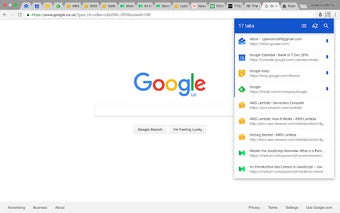
This extension allows users to efficiently manage their tabs by providing various features. With Keepin' Tabs, you can search for tabs by their title or URL simply by typing, without the need to click on a search button. Additionally, you can order your tabs by domain and manually drag and re-order them as desired.
Other useful functionalities include the ability to reload, pin or unpin, and close tabs directly from the extension. You can navigate through your tabs list using the up, down, and enter keys, and even select multiple tabs to perform actions on.
To open the extension, you can use the keyboard shortcut: Control + Shift + K on Windows or Command + Shift + K on Mac. If you prefer a different keyboard shortcut, you can customize it in the Chrome extensions preferences.
Please note that Keepin' Tabs requires permission to "Read your browsing history," but it only accesses the current state of each tab, not your actual browsing history. Feedback can be provided via email to